
R21xx-HP FlexFabric 11900 IP Multicast Configuration Guide

Table Of Contents
- Title Page
- Contents
- Multicast overview
- Configuring IGMP snooping
- Overview
- IGMP snooping configuration task list
- Configuring basic IGMP snooping functions
- Configuring IGMP snooping port functions
- Configuring IGMP snooping policies
- Displaying and maintaining IGMP snooping
- IGMP snooping configuration examples
- Troubleshooting IGMP snooping
- Configuring multicast routing and forwarding
- Configuring IGMP
- Configuring PIM
- Overview
- Configuring PIM-DM
- Configuring PIM-SM
- Configuring common PIM features
- Displaying and maintaining PIM
- PIM configuration examples
- Troubleshooting PIM
- Configuring MLD snooping
- Overview
- MLD snooping configuration task list
- Configuring basic MLD snooping functions
- Configuring MLD snooping port functions
- Configuring MLD snooping policies
- Displaying and maintaining MLD snooping
- MLD snooping configuration examples
- Troubleshooting MLD snooping
- Configuring IPv6 multicast routing and forwarding
- Configuring MLD
- Configuring IPv6 PIM
- PIM overview
- Configuring IPv6 PIM-DM
- Configuring IPv6 PIM-SM
- Configuring common IPv6 PIM features
- Displaying and maintaining IPv6 PIM
- IPv6 PIM configuration examples
- Troubleshooting IPv6 PIM
- Support and other resources
- Index
85
Ste
p
Command Remarks
1. Enter system view.
system-view N/A
2. Enter PIM view.
pim N/A
3. Configure a multicast data
filter:
source-policy acl-number
By default, no multicast data filter is
configured.
Configuring a hello message filter
Along with the wide applications of PIM, the security requirement for the protocol is becoming
increasingly demanding. The establishment of correct PIM neighboring relationships is the prerequisite
for secure application of PIM.
To guard against PIM message attacks, you can configure a legal source address range for hello
messages on interfaces of routers to ensure the correct PIM neighboring relationships.
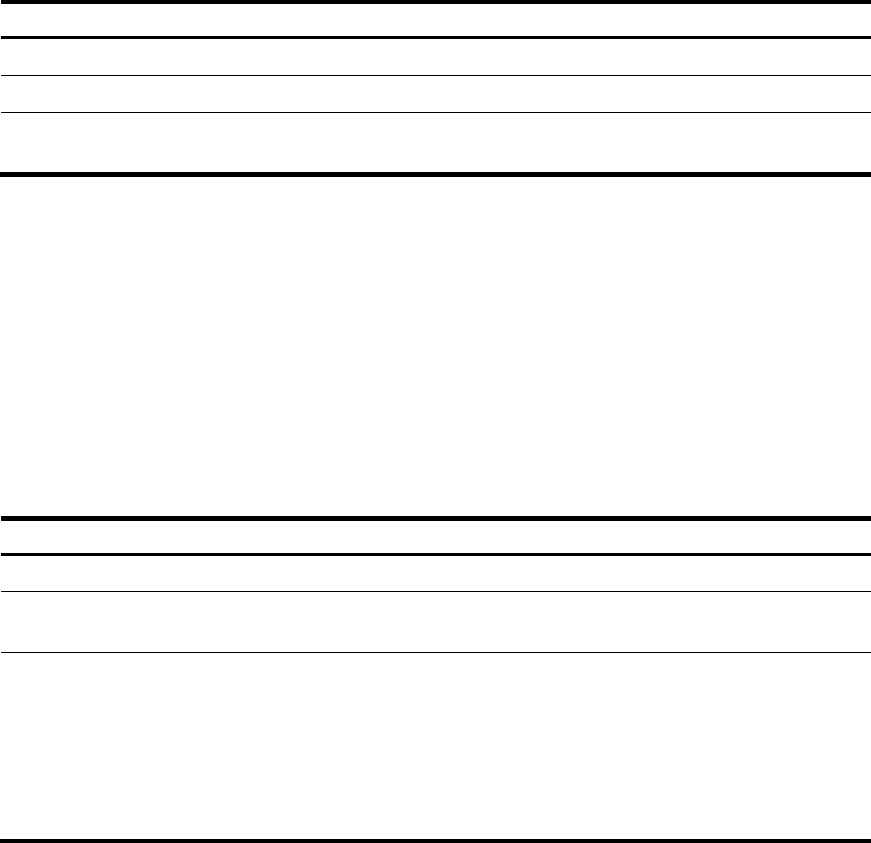
To configure a hello message filter:
Ste
p
Command
Remarks
1. Enter system view.
system-view
N/A
2. Enter interface view.
interface interface-type
interface-number
N/A
3. Configure a hello message
filter.
pim neighbor-policy acl-number
By default, no hello message filter
exists.
If a PIM neighbor's hello messages
cannot pass the filter, the neighbor
is automatically removed when its
maximum number of hello attempts
is reached.
Configuring PIM hello message options
In either a PIM-DM domain or a PIM-SM domain, hello messages exchanged among routers contain the
following configurable options:
• DR_Priority (for PIM-SM only)—Priority for DR election. The device with the highest priority wins the
DR election. You can configure this option for all the routers in a shared-media LAN that directly
connects to the multicast source or the receivers.
• Holdtime—PIM neighbor lifetime. If a router does not receive a hello message from a neighbor
when the neighbor lifetime expires, it regards the neighbor failed or unreachable.
• LAN_Prune_Delay—Delay of forwarding prune messages on a shared-media LAN. This option
consists of LAN delay (namely, prune message delay), override interval, and neighbor tracking
support (namely, the capability to disable join message suppression).
The prune message delay defines the delay time for a router to forward a received prune message
to the upstream routers. The override interval defines a period for a downstream router to override