
R21xx-HP FlexFabric 11900 IP Multicast Configuration Guide
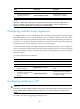
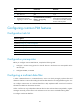
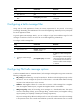
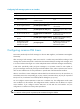
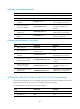

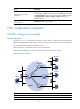
Table Of Contents
- Title Page
- Contents
- Multicast overview
- Configuring IGMP snooping
- Overview
- IGMP snooping configuration task list
- Configuring basic IGMP snooping functions
- Configuring IGMP snooping port functions
- Configuring IGMP snooping policies
- Displaying and maintaining IGMP snooping
- IGMP snooping configuration examples
- Troubleshooting IGMP snooping
- Configuring multicast routing and forwarding
- Configuring IGMP
- Configuring PIM
- Overview
- Configuring PIM-DM
- Configuring PIM-SM
- Configuring common PIM features
- Displaying and maintaining PIM
- PIM configuration examples
- Troubleshooting PIM
- Configuring MLD snooping
- Overview
- MLD snooping configuration task list
- Configuring basic MLD snooping functions
- Configuring MLD snooping port functions
- Configuring MLD snooping policies
- Displaying and maintaining MLD snooping
- MLD snooping configuration examples
- Troubleshooting MLD snooping
- Configuring IPv6 multicast routing and forwarding
- Configuring MLD
- Configuring IPv6 PIM
- PIM overview
- Configuring IPv6 PIM-DM
- Configuring IPv6 PIM-SM
- Configuring common IPv6 PIM features
- Displaying and maintaining IPv6 PIM
- IPv6 PIM configuration examples
- Troubleshooting IPv6 PIM
- Support and other resources
- Index
88
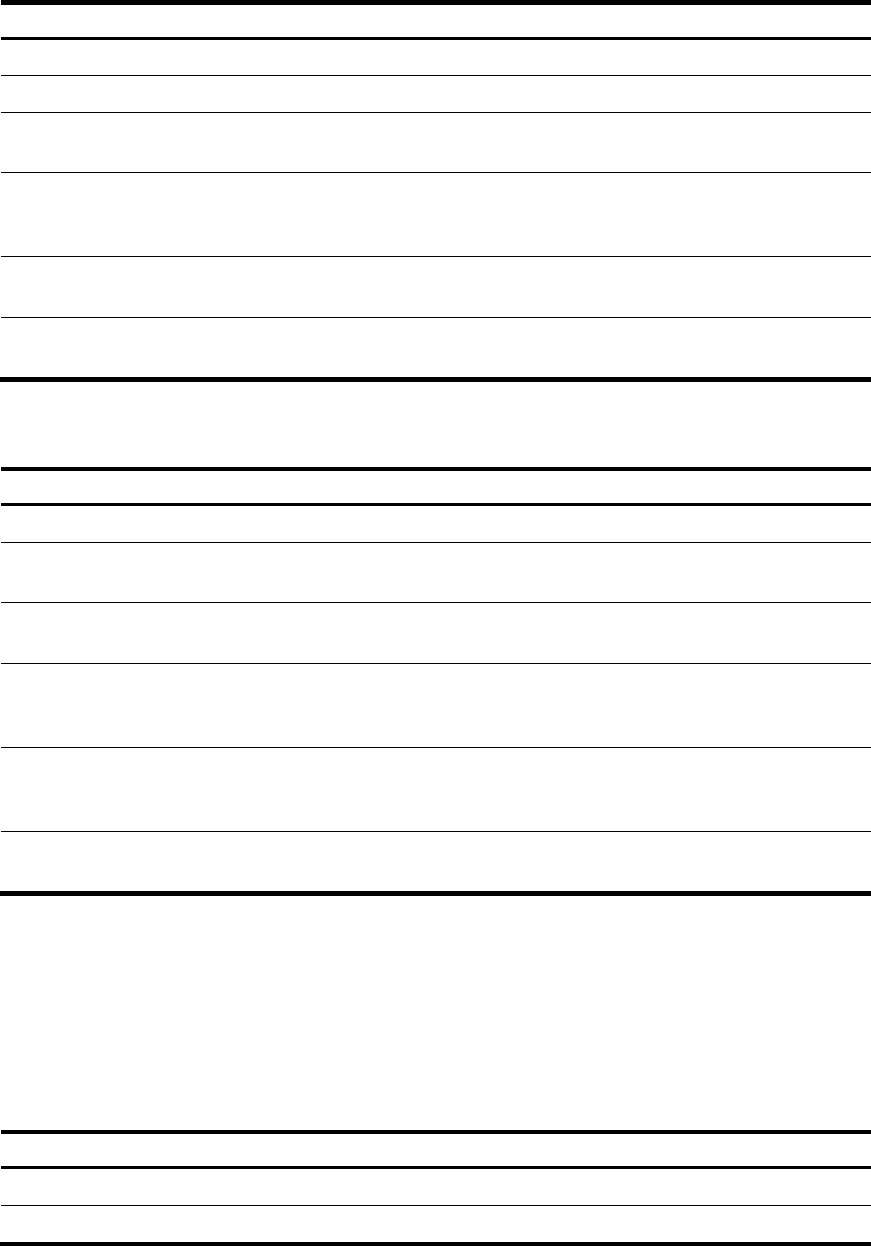
Configuring common PIM timers globally
Ste
p
Command Remarks
1. Enter system view.
system-view
N/A
2. Enter PIM view.
pim N/A
3. Set the interval to send hello
messages.
timer hello interval
By default, the interval to send
hello messages is 30 seconds.
4. Set the interval to send
join/prune messages.
timer join-prune interval
By default, the interval to send
join/prune messages is 60
seconds.
5. Set the joined/pruned state
holdtime timer.
holdtime join-prune time
By default, the joined/pruned state
holdtime timer is 210 seconds.
6. Set the multicast source
lifetime.
source-lifetime time
By default, the multicast source
lifetime is 210 seconds.
Configuring common PIM timers on an interface
Ste
p
Command Remarks
1. Enter system view.
system-view
N/A
2. Enter interface view.
interface interface-type
interface-number
N/A
3. Set the interval to send hello
messages.
pim timer hello interval
By default, the interval to send
hello messages is 30 seconds.
4. Set the maximum delay for
sending a hello message.
pim triggered-hello-delay delay
By default, the maximum delay for
sending a hello message is 5
seconds.
5. Set the interval to send
join/prune messages.
pim timer join-prune interval
By default, the interval to send
join/prune messages is 60
seconds.
6. Set the joined/pruned state
holdtime timer.
pim holdtime join-prune time
By default, the joined/pruned state
holdtime timer is 210 seconds.
Setting the maximum size of each join or prune message
The loss of an oversized join or prune message might result in loss of massive information. You can set a
small value for the size of each join or prune message to reduce the impact.
To set the maximum size of each join or prune message:
Ste
p
Command Remarks
1. Enter system view.
system-view N/A
2. Enter PIM view.
pim N/A