
R21xx-HP FlexFabric 11900 IRF Command Reference

7
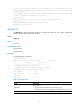
irf-port1/1 Load-Sharing Mode:
destination-mac address, source-mac address
irf-port1/2 Load-Sharing Mode:
Layer 2 traffic: destination-mac address, source-mac address
Layer 3 traffic: destination-ip address, source-ip address
Layer 4 traffic: destination-port, source-port
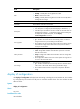
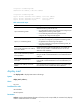
Table 4 Command output
Field Descri
p
tion
irf-port Load-Sharing Mode
Global load sharing mode for IRF links:
• If no global IRF link load sharing mode has been configured, the
default global load sharing mode applies.
• If a user-defined global load sharing mode has been
configured, the configured mode applies.
irf-port 1/1 Load-Sharing Mode
Link load sharing mode of IRF-port 1/1:
• If you have not configured a port-specific load sharing mode,
the global IRF link load sharing mode applies.
• If you have configured a port-specific load sharing mode, the
configured mode applies.
Layer 2 traffic: destination-mac address,
source-mac address
Default load sharing mode for traffic that has no IP header. By
default, this type of traffic is distributed based on source and
destination MAC addresses.
Layer 3 traffic: destination-ip address,
source-ip address
Default load sharing mode for non-TCP/-UDP IP packets. By default,
this type of traffic is distributed based on source and destination IP
addresses.
Layer 4 traffic: destination-port,
source-port
Default load sharing mode for TCP/UDP packets. By default, this
type of traffic is distributed based on source and destination port
numbers.
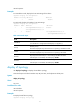
destination-mac address, source-mac
address
User-configured IRF link load sharing criteria. In this sample output,
the criteria are source and destination MAC addresses.
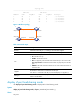
display mad
Use display mad to display MAD status and settings.
Syntax
display mad [ verbose ]
Views
Any view
Predefined user roles
network-admin
network-operator
Parameters
verbose: Displays detailed MAD information. If this keyword is not provided, the command only displays
whether a MAD mechanism is enabled.