
R21xx-HP FlexFabric 11900 IRF Command Reference

5
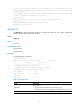
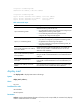
Topology Info
-------------------------------------------------------------------------
IRF-Port1 IRF-Port2
MemberID Link neighbor Link neighbor Belong To
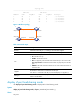
1 UP 3 UP 2 00e0-fc0f-8c0f
2 UP 1 UP 4 00e0-fc0f-8c0f
3 UP 4 UP 1 00e0-fc0f-8c0f
4 UP 2 UP 3 00e0-fc0f-8c0f
Figure 1 IRF fabric topology
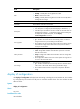
Table 3 Command output
Field Descri
p
tion
IRF-Port 1 Information about IRF-port 1, including its link state and neighbor.
IRF-Port 2 Information about IRF-port 2, including its link state and neighbor.
Link
Link state of the IRF port:
• UP—The IRF link is up.
• DOWN—The IRF link is down.
• DIS—No physical ports have been bound to the IRF port. You must use the
port group interface command to bind at least one physical port to the IRF
port.
• TIMEOUT—IRF hello interval has timed out. You must examine the link for a
connection loss.
neighbor
IRF member ID of the device connected to the IRF port.
If no device is connected to the IRF port, this field displays two hyphens (--).
Belong To
IRF fabric that has the device, represented by the CPU MAC address of the
master in the IRF fabric.
display irf-port load-sharing mode
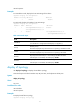
Use display irf-port load-sharing mode to display IRF link load sharing mode.
Syntax
display irf-port load-sharing mode [ irf-port [ member-id/port-number ] ]
Views
Any view
IRF-port1/2 IRF-port2/1
1
2
IRF-port1/1
IRF-port2/2
IRF-port3/2
IRF-port3/1 IRF-port4/2
IRF-port4/1
3
4