
R21xx-HP FlexFabric 11900 IRF Configuration Guide

9
BFD MAD
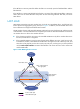
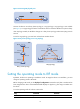
BFD MAD can work with or without intermediate devices. Figure 7 shows a typical BFD MAD application
scenario.
To use BFD MAD:
• Set up dedicated BFD MAD link between each pair of IRF members or between each IRF member
and the intermediate device. Do not use the BFD MAD links for any other purpose.
• Assign the ports connected by BFD MAD links to the same VLAN, create a VLAN interface for the
VLAN, and assign a MAD IP address to each member on the VLAN interface.
The MAD IP addresses identify the member devices and must belong to the same subnet.
With BFD MAD, the master tries to establish BFD sessions with the other member devices by using its
MAD IP address as the source IP address:
• If the IRF fabric is integrated, only the MAD IP address of the master is effective, and the master
cannot establish a BFD session with any other member. If you execute the display bfd session
command, the state of the BFD sessions is Down.
• When the IRF fabric splits, the IP addresses of the masters in the split IRF fabrics take effect, and the
two masters can establish a BFD session. If you use the display bfd session command, the state of
the BFD session between the two devices is Up.
Figure 7 BFD MAD application scenario
Device
Master
Subordinate
IRF
Internet
Customer
premise
network
IRF link
Link aggregation
BFD MAD link
VLAN 2
192.168.1.2/24
VLAN 2
192.168.1.3/24