
R21xx-HP FlexFabric 11900 IRF Configuration Guide

16
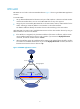
Figure 8 Connecting IRF physical ports
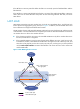
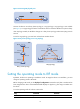
Connect the devices into a daisy chain topology or a ring topology. A ring topology is more reliable
(see Figure 9)
. In ring topology, the failure of one IRF link does not cause the IRF fabric to split as in daisy
chain topology. Instead, the IRF fabric changes to a daisy chain topology without interrupting network
services.
To use the ring topology, you must have at least three member devices.
Figure 9 Daisy chain topology versus ring topology
Setting the operating mode to IRF mode
By default, the device is operating in standalone mode. To assign the device to an IRF fabric, you must
change its operating mode to IRF mode.
Before changing to IRF mode, use the display irf configuration command to verify that a member ID has
been assigned to the device. If the MemberID field displays two hyphens (--), first assign a member ID to
the device.
To set the operating mode of a device to IRF mode:
Ste
p
Command
Remarks
1. Enter system view.
system-view N/A
IRF
Ring topology
Subordinate Subordinate
Master
IRF-Port1 IRF-Port2
IRF-Port1
IRF-Port2IRF-Port1
IRF-Port2
Daisy chain topology
IRF
Master
Subordinate
Subordinate
IRF-Port2
IRF-Port2
IRF-Port1
IRF-Port1