
R21xx-HP FlexFabric 11900 IRF Configuration Guide

17
Ste
p
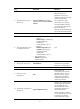
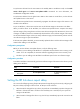
Command
Remarks
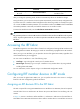
2. Set the operating mode to
IRF mode.
chassis convert mode irf
The default operating mode is
standalone mode.
After you change the operating mode, the device automatically reboots to validate the change.
During the reboot, you can choose to have the system automatically convert the startup configuration file
to prevent some slot- or interface-related configurations from becoming invalid. For example, the system
can convert the slot slot-number parameter set in standalone mode to the chassis chassis-number slot
slot-number parameter in IRF mode, and add the chassis ID in an interface number.
To restore the standalone mode, use the undo chassis convert mode command.
TIP:
IRF generates packets on a device in IRF mode even if the device does not form an IRF fabric with any other
device. To protect system resources, set a device to operate in standalone mode after removin
g
it from an
IRF fabric.
Accessing the IRF fabric
The IRF fabric appears as one device after it is formed. You configure and manage all IRF members at the
CLI of the global active MPU. All settings you made are automatically propagated to the IRF members.
When you log in to an IRF fabric, you are placed at the CLI of the global active MPU, regardless of at
which member device you are logged in.
You can access an IRF fabric in one of the following ways:
• Local login—Log in through the console port of a member device.
• Remote login—Remotely log in at a Layer 3 interface on any member device by using methods
including Telnet and SNMP.
For more information, see the chapter on login in Fundamentals Configuration Guide.
Configuring IRF member devices in IRF mode
After you access the global active MPU's CLI, you can perform the tasks in this section or configure
features in all other configuration guides for the device.
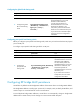
Assigning an IRF domain ID to the IRF fabric
This task is required for running LACP MAD between two IRF fabrics. For BFD MAD, this task is optional.
One IRF fabric forms one IRF domain. IRF domain IDs prevent IRF fabrics from interfering with one
another.
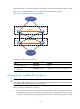
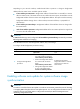
In Figure 10, D
evice A and Device B form IRF fabric 1, and Device C and Device D form IRF fabric 2.
These fabrics have LACP MAD links between them. When a member device in one IRF fabric receives an