
R21xx-HP FlexFabric 11900 IRF Configuration Guide

18
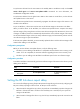
LACP MAD packet, it looks at the domain ID in the packet to see whether the packet is from the local IRF
fabric or from a different IRF fabric. Then, the device can handle the packet correctly.
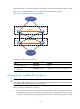
Figure 10 A network that comprises two IRF domains
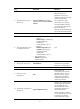
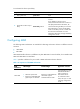
To assign a domain ID to an IRF fabric:
Ste
p
Command
Remarks
1. Enter system view.
system-view N/A
2. Assign a domain ID to the
IRF fabric.
irf domain domain-id By default, the domain ID of an IRF fabric is 0.
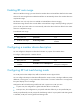
Changing the member ID of a device
CAUTION:
In IRF mode, an IRF member ID change can invalidate member ID-related settin
g
s and cause data loss. Be
sure you fully understand its impact on your live network.
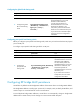
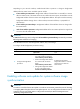
After you change the member ID of a device:
• If you do not reboot the device, the original member ID still takes effect and all physical resources
are identified by the original member ID. In the configuration file, only the IRF port numbers, settings
on IRF ports, and IRF member priority change with the member ID. All other settings do not change.
Device A
Device B
IRF 1 (domain 10)
IRF link
Core network
IRF 2 (domain 20)
IRF link
Device c
Device D
Access network