
R21xx-HP FlexFabric 11900 IRF Configuration Guide

19
• If you save the current configuration and reboot the device, the new member ID takes effect and all
its physical resources are identified by the new member ID. In the configuration file, only the IRF port
numbers, configurations on IRF ports, and member priority still take effect. All other member
ID-related settings, including settings on the physical IRF port and chassis ID, no longer take effect
and must be reconfigured.
IMPORTANT:
You must place a device in standalone mode before renumberin
g
it in one of the followin
g
two situations:
• The physical IRF ports of the device are 10-GE ports that are divided from a 40-GE QSFP+ port.
• You are exchanging the member IDs of multiple devices. In this case, place each device in standalone
mode.
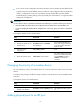
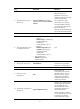
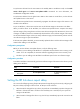
To change the member ID of a member device:
Ste
p
Command
Remarks
1. Enter system view.
system-view N/A
2. Change the member ID of a
member device.
irf member member-id renumber
new-member-id
If a two-chassis IRF fabric has
OAA cards, assign member ID 1
or 2 to the member device that
holds the cards.
3. Save the running
configuration.
save [ safely ] [ force ] N/A
4. Reboot the member device.
reboot chassis chassis-number
The chassis-number must be the
same as the member-id specified
in the irf member member-id
renumber new-member-id
command.
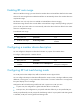
Changing the priority of a member device
You can change the priority of a member device so it can be elected the master at the next master
election.
A member priority change can affect the master re-election result, but does not cause immediate master
re-election.
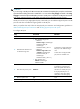
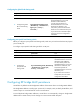
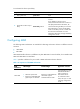
To change the priority of a member device:
Ste
p
Command
Remarks
1. Enter system view.
system-view N/A
2. Specify a priority for a
member of an IRF fabric.
irf member member-id priority priority
The default IRF member priority
is 1.
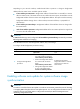
Adding physical ports to an IRF port