
R21xx-HP FlexFabric 11900 IRF Configuration Guide

20
W
ARNING!
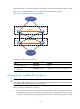
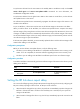
If you are using a 40-GE port for IRF connection, HP recommends completin
g
the port split or combination
operation before adding the switch to an IRF fabric. You can use the using tengige command or the usin
g
fortygige command to split 40-GE QSFP+ ports into 10-GE ports or recombine 10-GE ports into 40-GE
ports. These operations require a card reboot and might cause an IRF fabric topology change.
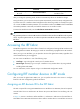
An IRF port can have up to eight physical ports. In IRF mode, you can add more physical ports to an IRF
port. This task does not affect the ongoing traffic on the IRF port.
When you perform this task, follow the IRF physical port restrictions and configuration guidelines in
"MPU and IRF physical port restrictions" and "Binding physical ports to IRF ports."
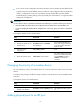
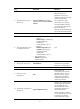
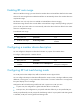
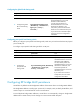
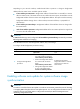
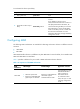
To configure IRF ports:
Ste
p
Command
Remarks
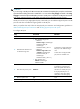
1. Enter system view.
system-view N/A
2. Enter Ethernet interface view
or interface range view.
• Enter interface range view:
{ Method 1:
interface range { interface-type
interface-number [ to
interface-type
interface-number ] } &<1-5>
{ Method 2:
interface range name name
[ interface { interface-type
interface-number [ to
interface-type
interface-number ] } &<1-5> ]
• Enter interface view:
interface interface-type
interface-number
To shut down a range of physical
IRF ports, enter interface range
view.
To shut down one physical IRF
port, enter its interface view.
3. Shut down the port or ports.
shutdown
If the system does not allow you
to shut down a physical port,
follow the system instruction to
shut down its remote peer port.
If one physical IRF port is a
10-GE port, shut down all the
other ports in the same group.
4. Return to system view.
quit N/A
5. Enter IRF port view.
irf-port member-id/port-number N/A