
R21xx-HP FlexFabric 11900 IRF Configuration Guide

21
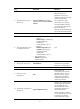
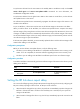
Ste
p
Command
Remarks
6. Bind each physical port to
the IRF port.
port group interface interface-type
interface-number [ mode { enhanced |
normal } ]
By default, no physical ports are
bound to any IRF port.
Repeat this step to assign
multiple physical ports to the IRF
port for link redundancy.
You can bind up to eight
physical ports to an IRF port.
The binding attempt will fail if
you have bound eight physical
ports to the IRF port.
Make sure the two ends of an IRF
link use the same binding mode.
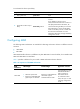
7. Return to system view.
quit N/A
8. Enter physical IRF port view
or interface range view.
• Enter interface range view:
{ Method 1:
interface range { interface-type
interface-number [ to
interface-type
interface-number ] } &<1-5>
{ Method 2:
interface range name name
[ interface { interface-type
interface-number [ to
interface-type
interface-number ] } &<1-5> ]
• Enter interface view:
interface interface-type
interface-number
N/A
9. Bring up the port or ports.
undo shutdown
If a 10-GE port is used for IRF
connection, bring up all the
other ports in the same group.
10. Return to system view.
quit N/A
11. Save the running
configuration.
save
Activating IRF port
configurations can cause IRF
merge and reboot. To avoid
data loss, save the running
configuration to the startup
configuration file before you
perform the operation.
12. Activate the configuration on
the IRF port.
irf-port-configuration active
After this step is performed, the
state of the IRF port changes to
UP, the member devices
automatically elect a master,
and the subordinate device
automatically reboots.
After the IRF fabric is formed,
you can add more physical ports
to an IRF port (in UP state)
without performing this step.