
R21xx-HP FlexFabric 11900 IRF Configuration Guide

22
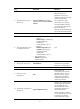
Enabling IRF auto merge
When two IRF fabrics merge, you must reboot the member devices in the IRF fabric that fails in the master
election. The auto merge function enables the IRF fabric to automatically reboot all its member devices to
complete the merge.
This function can work only when it is enabled on both IRF fabrics that are merging.
The IRF auto merge function does not take effect on the IRF fabric merge caused by binding a physical
port to an IRF port in IRF mode. You must manually reboot the devices that have failed in the master
election to complete the merge.
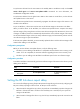
To enable IRF auto merge:
Ste
p
Command
Remarks
1. Enter system view.
system-view N/A
2. Enable IRF auto merge.
irf auto-merge enable
By default, this function is
disabled.
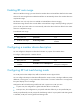
Configuring a member device description
You can configure a description to describe the location or purpose of a member device.
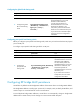
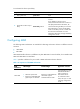
To configure a description for a member device:
Ste
p
Command
Remarks
1. Enter system view.
system-view N/A
2. Configure the description of
a member.
irf member member-id description text
By default, no member device
description is configured.
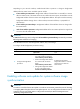
Configuring IRF link load sharing mode
On an IRF port that has multiple links, traffic is balanced across its physical links.
You can configure the IRF port to distribute traffic based on certain criteria, including IP addresses, MAC
addresses, incoming ports, or any combination of the criteria. If a criteria combination is not supported,
the system displays an error message.
Configure the IRF link load sharing mode for IRF links in system view or IRF port view:
• In system view, the configuration is global and takes effect on all IRF ports.
• In IRF port view, the configuration is port specific and takes effect only on the specified IRF port.
An IRF port preferentially uses the port-specific load sharing mode. If no port-specific load sharing mode
is available, an IRF port uses the global load sharing mode.