
R21xx-HP FlexFabric 11900 IRF Configuration Guide

23
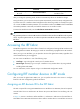
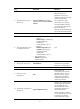
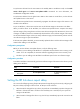
Configuring the global load sharing mode
Ste
p
Command
Remarks
1. Enter system view.
system-view N/A
2. Configure the global
IRF link load sharing
mode.
irf-port global load-sharing mode
{ destination-ip | destination-mac |
ingress-port | source-ip |
source-mac } *
By default, non-IP packets are
distributed based on source and
destination MAC addresses,
non-TCP/-UDP IP packets are
distributed based on source and
destination IP addresses, and
TCP/UDP IP packets are distributed
based on source and destination ports.
If you execute this command multiple
times, the most recent configuration
takes effect.
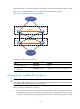
Configuring port-specific load sharing criteria
Before you configure a port-specific load sharing mode, make sure you have bound at least one physical
port to the IRF port.
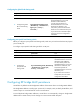
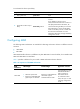
To configure a port-specific load sharing mode for an IRF port:
Ste
p
Command
Remarks
1. Enter system view.
system-view N/A
2. Enter IRF port view.
irf-port member-id/port-number N/A
3. Configure the
port-specific load
sharing mode.
irf-port load-sharing mode { destination-ip
| destination-mac | ingress-port |
source-ip | source-mac } *
By default, non-IP packets are
distributed based on source and
destination MAC addresses,
non-TCP/-UDP IP packets are
distributed based on source and
destination IP addresses, and
TCP/UDP IP packets are
distributed based on source and
destination ports.
If you execute this command
multiple times, the most recent
configuration takes effect.
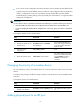
Configuring IRF bridge MAC persistence
An IRF fabric by default uses the bridge MAC address of the master device as its bridge MAC address.
This bridge MAC address is used by Layer 2 protocols, for example, LACP, to identify the IRF fabric, and
must be unique on a switched LAN for correct communication.
To avoid duplicate bridge MAC addresses, an IRF fabric can automatically change its bridge MAC
address after its master leaves, but the change can cause transient traffic disruption.