
R21xx-HP FlexFabric 11900 IRF Configuration Guide

24
Depending on your network condition, enable the IRF fabric to preserve or change its bridge MAC
address after the master leaves. Available options include:
• irf mac-address persistent timer—Bridge MAC address of the IRF fabric is retained for 6 minutes
after the master leaves. If the master does not return before the timer expires, the IRF fabric uses the
bridge MAC address of the new master as its bridge MAC address. This option avoids unnecessary
bridge MAC address change due to a device reboot, transient link failure, or purposeful link
disconnection.
• irf mac-address persistent always—Bridge MAC address of the IRF fabric does not change after
the master leaves.
• undo irf mac-address persistent—Bridge MAC address of the new master replaces the original one
as soon as the old master leaves.
IMPORTANT:
If VRRP load balancing is used, configure the irf mac-address persistent always command to prevent the
IRF bridge MAC address from changing.
If two IRF fabrics have the same bridge MAC address, they cannot merge.
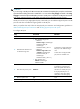
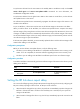
To configure the IRF bridge MAC persistence setting:
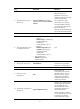
Ste
p
Command
Remarks
1. Enter system view.
system-view N/A
2. Configure IRF bridge MAC
persistence.
• Retain the bridge MAC address
even if the master has changed:
irf mac-address persistent always
• Preserve the bridge MAC address
for 6 minutes after the master
leaves:
irf mac-address persistent timer
• Change the bridge MAC address
as soon as the master leaves:
undo irf mac-address persistent
By default, the IRF fabric's
bridge MAC address is retained
permanently even after the
master leaves.
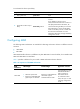
Enabling software auto-update for system software image
synchronization
IMPORTANT:
To ensure a successful software auto-update in a multi-user environment, prevent the action of rebootin
g
or swapping MPUs during the software auto-update process. You can configure the information center to
output the software auto-update status to configuration terminals (see
Network Management and
Monitoring Configuration Guide
).