
R21xx-HP FlexFabric 11900 IRF Configuration Guide

25
To synchronize software from the active MPU to the standby MPU in standalone mode, use the undo
version check ignore and version auto-update enable commands. For more information, see
Fundamentals Configuration Guide.
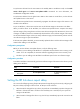
To synchronize software from the global active MPU to other MPUs in an IRF fabric, use the software
auto-update function in this section.
The software auto-update function automatically propagates the software images of the master to all
members in the IRF fabric.
To join an IRF fabric, a device must use the same set of software images as the master in the fabric.
When you add a device to the IRF fabric, the software auto-update function compares the startup
software images of the joining device with the current software images of the IRF master. If the two sets
of images are different, the device automatically downloads the current software images of the master,
sets the downloaded images as the main startup software images, and automatically reboots with the
new software images to rejoin the IRF fabric.
If software auto-update is disabled, you must manually update the device with the software images of the
master before adding it to the IRF fabric.
Configuration prerequisites
Before you use the software auto-update function, verify the following items:
• The device you are adding to the IRF fabric is compatible with the software version running on the
master. If it is not compatible, the automatic software upgrading function cannot correctly work.
• The device you are adding to the IRF fabric has sufficient space for the new software images.
Configuration procedure
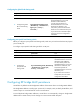
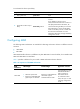
To enable an IRF fabric to automatically synchronize software images of the master to the devices you are
adding to the IRF fabric:
Ste
p
Command
Remarks
1. Enter system view.
system-view N/A
2. Enable software
auto-update.
irf auto-update enable
By default, this function is
enabled.
Setting the IRF link down report delay
You can avoid link flapping causing frequent IRF splits and merges during a short time by configuring the
IRF ports to delay reporting link down events. An IRF port works as follows:
• When the IRF link changes from up to down, the port does not immediately report the change to the
IRF fabric. If the IRF link state is still down when the delay time is reached, the port reports the
change to the IRF fabric.
• When the IRF link changes from down to up, the link layer immediately reports the event to the IRF
fabric.