
R21xx-HP FlexFabric 11900 IRF Configuration Guide

26
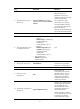
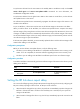
To set the IRF link down report delay:
Ste
p
Command
Remarks
1. Enter system view.
system-view N/A
2. Set the IRF link down report
delay.
irf link-delay interval
The default IRF link down report delay is 4
seconds.
If your IRF fabric requires a quick
master/subordinate or IRF link switchover or
has deployed the BFD or GR feature, HP
recommends setting the delay to 0 seconds.
If the CFD feature is used in the IRF fabric,
make sure the delay interval is smaller than
the maximum CCM lifetime. For more
information about CFD, see High Availability
Configuration Guide.
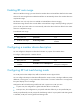
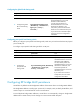
Configuring MAD
The following MAD mechanisms are available for detecting multi-active collisions in different network
scenarios:
• LACP MAD
• BFD MAD
LACP MAD handles collisions in a different way than BFD MAD. To avoid conflicts, do not enable LACP
MAD with BFD MAD in an IRF fabric.
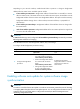
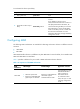
Table 1 pr
ovides a reference for you to make a MAD mechanism selection decision.
Table 1 A comparison of the MAD mechanisms
MAD
mechanism
Advantages Disadvantages Application scenario
LACP MAD
• Detection speed is fast.
• Requires no MAD-dedicated
physical ports or interfaces.
Requires an intermediate HP
device that supports
extended LACP for MAD.
Link aggregation is used
between the IRF fabric
and its upstream or
downstream device.
For information about
LACP, see Layer 2—LAN
Switching Configuration
Guide.