
R21xx-HP FlexFabric 11900 IRF Configuration Guide

27
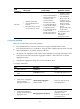
MAD
mechanism
Advantages Disadvantages Application scenario
BFD MAD
• Detection speed is fast.
• No intermediate device is
required.
• Intermediate device, if used,
can come from any vendor.
• Requires MAD dedicated
physical ports and Layer
3 interfaces, which
cannot be used for
transmitting user traffic.
• If no intermediate device
is used, the IRF members
must be fully meshed.
• If an intermediate device
is used, every IRF
member must connect to
the intermediate device.
• Suitable for various
network scenarios.
• If no intermediate
device is used, this
mechanism is only
suitable for IRF fabrics
that have a small
number of members
that are
geographically close
to one another.
For information about
BFD, see High
Availability
Configuration Guide.
Configuring LACP MAD
When you use LACP MAD, follow these guidelines:
• The intermediate device must be an HP device that support extended LACP for MAD.
• If the intermediate device is in an IRF fabric, assign this fabric a different domain ID than the LACP
MAD-enabled fabric to avoid false detection of IRF split.
• Use dynamic link aggregation mode. MAD is LACP dependent. Even though LACP MAD can be
configured on both static and dynamic aggregate interfaces, it takes effect only on dynamic
aggregate interfaces.
• Configure link aggregation settings also on the intermediate device.
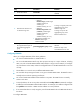
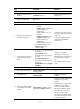
To configure LACP MAD:
Ste
p
Command
Remarks
1. Enter system view.
system-view N/A
2. Assign a domain ID to the IRF
fabric.
irf domain domain-id The default IRF domain ID is 0.
3. Create a Layer 2 aggregate
interface and enter
aggregate interface view.
interface bridge-aggregation
interface-number
Perform this step also on the
intermediate device.
4. Configure the aggregation
group to operate in dynamic
aggregation mode.
link-aggregation mode dynamic
By default, an aggregation
group operates in static
aggregation mode.
Perform this step also on the
intermediate device.