
R21xx-HP FlexFabric 11900 IRF Configuration Guide

28
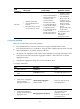
Ste
p
Command
Remarks
5. Enable LACP MAD.
mad enable
By default, LACP MAD is
disabled.
6. Return to system view.
quit N/A
7. Enter Ethernet interface view
or interface range view.
• Enter interface range view:
{ Method 1:
interface range { interface-type
interface-number [ to
interface-type
interface-number ] } &<1-5>
{ Method 2:
interface range name name
[ interface { interface-type
interface-number [ to
interface-type
interface-number ] } &<1-5> ]
• Enter Ethernet interface view:
interface interface-type
interface-number
To assign a range of ports to the
aggregation group, enter
interface range view.
To assign one port to the
aggregation group, enter
Ethernet interface view.
8. Assign the Ethernet port or
the range of Ethernet ports to
the specified aggregation
group.
port link-aggregation group number
Multichassis link aggregation is
allowed.
Perform this step on the
intermediate device as well.
Configuring BFD MAD
When you configure BFD MAD, follow these guidelines:
• You cannot enable BFD MAD on VLAN-interface 1.
• Do not use the BFD MAD VLAN for any other purpose. No Layer 2 or Layer 3 features, including
LACP, can work on the BFD MAD-enabled VLAN interface or any port in the VLAN. If you configure
any other feature on the VLAN, neither the configured feature nor the BFD MAD function can work
correctly.
• The IRF fabrics in a network must use different BFD MAD VLANs.
• Do not enable the spanning tree feature on any port in the BFD MAD VLAN. The MAD function is
mutually exclusive with the spanning tree feature.
• Do not bind a BFD MAD-enabled VLAN interface to any VPN. The MAD function is mutually
exclusive with VPN.
• To avoid problems, do not use any other command than the mad ip address command to configure
IP addresses on the BFD MAD-enabled VLAN interface. For example, an IP address configured with
the ip address command or a VRRP virtual IP address can cause problems.
• If an intermediate device is used, assign the ports of the BFD MAD links to the BFD MAD VLAN on
the device.
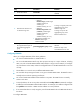
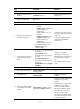
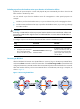
To configure BFD MAD: