
R21xx-HP FlexFabric 11900 IRF Configuration Guide

29
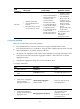
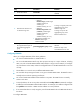
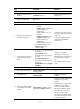
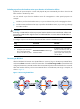
Ste
p
Command
Remarks
1. Enter system view.
system-view N/A
2. Assign a domain ID to the
IRF fabric.
irf domain domain-id
By default, the domain ID of an
IRF fabric is 0.
3. Create a new VLAN
dedicated to BFD MAD.
vlan vlan-id
The default VLAN on the device
is VLAN 1.
4. Return to system view.
quit N/A
5. Enter Ethernet interface view
or interface range view.
• Enter interface range view:
{ Method 1:
interface range { interface-type
interface-number [ to
interface-type
interface-number ] } &<1-5>
{ Method 2:
interface range name name
[ interface { interface-type
interface-number [ to
interface-type
interface-number ] } &<1-5> ]
• Enter Ethernet interface view:
interface interface-type
interface-number
To assign a range of ports to the
BFD MAD VLAN, enter interface
range view.
To assign one port to the BFD
MAD VLAN, enter Ethernet
interface view.
6. Assign the port or the range
of ports to the BFD MAD
VLAN.
• Assign the port to the VLAN as an
access port:
port access vlan vlan-id
• Assign the port to the VLAN as a
trunk port:
port trunk permit vlan vlan-id
• Assign the port to the VLAN as a
hybrid port:
port hybrid vlan vlan-id { tagged |
untagged }
Choose one command
depending on the port type.
BFD MAD has no requirement for
the link type of the detection
port.
The default link type of a port is
access.
7. Return to system view.
quit N/A
8. Enter VLAN interface view.
interface vlan-interface
interface-number
N/A
9. Enable BFD MAD.
mad bfd enable
By default, BFD MAD is
disabled.
10. Configure a MAD IP address
for a member on the VLAN
interface.
mad ip address ip-address { mask |
mask-length } member member-id
By default, no MAD IP address is
configured on any VLAN
interface.
Repeat this step to assign a MAD
IP address to each member
device on the VLAN interface.
The MAD IP addresses identify
the member devices and must
belong to the same subnet.
Do not specify IP addresses that
are used on any member devices
as MAD IP addresses.