
R21xx-HP FlexFabric 11900 IRF Configuration Guide

30
Excluding a port from the shutdown action upon detection of multi-active collision
By default, all ports except the console and physical IRF ports automatically shut down when the IRF
fabric transits to the Recovery state.
You can exclude a port from the shutdown action for management or other special purposes. For
example:
• Exclude a port from the shutdown action, so you can Telnet to the port for managing the device.
• Exclude a VLAN interface and its Layer 2 ports from the shutdown action, so you can log in through
the VLAN interface.
CAUTION:
Excluding a VLAN interface and its Layer 2 ports from the shutdown action introduces IP collision risks
because the VLAN interface might be active on both the IRF fabric in Active state and the IRF fabric in
Recovery state.
To configure a port to not shut down when the IRF fabric transits to the Recovery state:
Ste
p
Command
Remarks
1. Enter system view.
system-view N/A
2. Configure a port to not shut
down when the IRF fabric
transits to the Recovery state.
mad exclude interface interface-type
interface-number
By default, when an IRF fabric
transits to the Recovery state, all
its network ports except the IRF
physical ports and console port
are shut down.
Recovering an IRF fabric
After the failed IRF link between two split IRF fabrics is recovered, log in to the Recovery-state IRF fabric,
and use the reboot command to reboot all its members. If the irf auto-merge enable command has been
configured, the Recovery-state IRF member devices automatically reboot after the failed link is recovered.
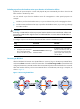
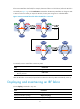
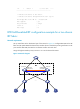
After these member devices join the Active-state IRF fabric as subordinates, IRF merge is complete, as
shown in Figure 11.
Figure 11 Recovering the IRF fabric