
R21xx-HP FlexFabric 11900 IRF Configuration Guide

31
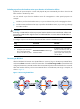
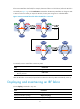
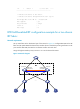
If the Active-state fabric has failed, for example, because of device or link failures, before the IRF link is
recovered (see Figure 12)
, use the mad restore command on the Recovery-state fabric to change its state
to Active to take over. After you repair the IRF link, the two parts merge into a unified IRF fabric.
Figure 12 Active-state IRF fabric fails before the IRF link is recovered
To manually recover an IRF fabric in Recovery state:
Ste
p
Command
1. Enter system view.
system-view
2. Change the state of the IRF fabric from
Recovery to Active.
mad restore
After the IRF fabric is recovered, all ports that have been shut down by MAD automatically come up.
Displaying and maintaining an IRF fabric
Execute display commands in any view.
Task Command
Display information about all IRF members. display irf
Display the IRF fabric topology. display irf topology
Display basic IRF settings. display irf configuration