
R21xx-HP FlexFabric 11900 IRF Configuration Guide

32
Task Command
Display the load sharing mode for IRF links.
display irf-port load-sharing mode [ irf-port
[ member-id/port-number ] ]
Display MAD configuration. display mad [ verbose ]
Configuration examples
This section provides IRF configuration examples for two-chassis and four-chassis IRF fabrics that use
different MAD mechanisms.
LACP MAD-enabled IRF configuration example for a
two-chassis IRF fabric
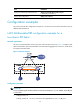
Network requirements
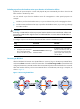
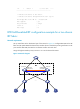
Set up a two-chassis IRF fabric at the access layer of the enterprise network in Figure 13. Configure LACP
MAD in the IRF fabric, because the IRF fabric has a multichassis aggregate link to Device C, an HP device
that supports extended LACP.
Figure 13 Network diagram
Configuration procedure
IMPORTANT:
For two neighboring IRF members, IRF links must be bound to IRF-port 1 on one member and to IRF-por
t
2 on the other.
1. Configure Device A:
# Assign member ID 1 to Device A and bind Ten-GigabitEthernet 3/0/1 to IRF-port 2.