
R21xx-HP FlexFabric 11900 IRF Configuration Guide

36
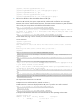
*+2 1 Master 1 00e0-fc0f-8c20 -----
--------------------------------------------------
* indicates the device is the master.
+ indicates the device through which the user logs in.
The Bridge MAC of the IRF is: 0023-895f-954f
Auto upgrade : yes
Mac persistent : always
Domain ID : 1
Auto merge : no
BFD MAD-enabled IRF configuration example for a two-chassis
IRF fabric
Network requirements
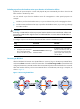
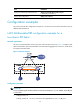
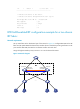
Set up an IRF fabric at the distribution layer of the network in Figure 14. Configure BFD MAD in the IRF
fabric and set up BFD MAD links between the member devices. Disable the spanning tree feature on the
ports used for BFD MAD, because the two features conflict with each other.
Assign the highest member priority to Device A so it can be elected the master.
Figure 14 Network diagram
XGE1/3/0/1
(IRF-port1/2)
XGE2/3/0/1
(IRF-port2/1)
GE1/4/0/1
GE2/4/0/1
Device A
Device B
IRF
BFD MAD link
……