
R21xx-HP FlexFabric 11900 IRF Configuration Guide

39
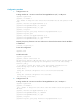
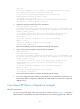
detected, please fix it.
Because it has a higher member ID than Device A, Device B transits to the Recovery state and shuts
down all its ports except those excluded from the shutdown action.
# Repair the IRF link. (Details not shown.)
When the IRF link is recovered, the system prompts you to reboot the IRF system.
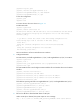
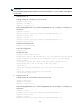
%May 6 15:12:52:935 2010 HP STM/6/STM_LINK_STATUS_UP:
IRF port 1 is up.
%May 6 15:13:02:828 2010 HP STM/4/STM_MERGE_NEED_REBOOT:
IRF merge occurs and the IRF system needs a reboot.
# Log in to the console port of Device B and reboot the device.
<Sysname> reboot
Start to check configuration with next startup configuration file, please wait.
.........DONE!
This command will reboot the device. Continue? [Y/N]:y
#May 6 15:31:09:724 2010 HP DEVM/1/REBOOT:
Reboot device by command.
%May 6 15:31:09:734 2010 HP DEVM/5/SYSTEM_REBOOT: System is rebooting now.
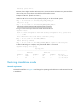
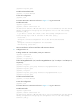
# After the IRF merge is complete, verify that the IRF fabric is recovered.
<Sysname> display irf topology
Topology Info
-------------------------------------------------------------------------
IRF-Port1 IRF-Port2
MemberID Link neighbor Link neighbor Belong To
2 DOWN -- UP 1 00e0-fc0f-8c02
1 UP 2 DIS -- 00e0-fc0f-8c02
Restoring standalone mode
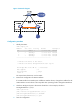
Network requirements
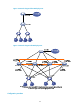
Dismantle the IRF fabric in Figure 15 and change the operating mode of Device A and Device B from IRF
to standalone.