
R21xx-HP FlexFabric 11900 IRF Configuration Guide
41
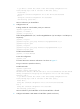
[IRF] save
The current configuration will be written to the device. Are you sure? [Y/N]:y
Please input the file name(*.cfg)[flash:/startup.cfg]
(To leave the existing filename unchanged, press the enter key):
flash:/startup.cfg exists, overwrite? [Y/N]:y
Validating file. Please wait.....................................
The current configuration is saved to the active main board successfully.
Configuration is saved to device successfully.
5. Change the operating mode of Device A to standalone.
[IRF] undo chassis convert mode
The device will switch to stand-alone mode and reboot. You are recommended to save
the current running configuration and specify the configuration file for the next
startup. Continue? [Y/N]:y
Do you want to convert the content of the next startup configuration file
flash:/startup.cfg to make it available in stand-alone mode? [Y/N]:y
Please wait.............
Saving the converted configuration file to main board succeeded.
Chassis 1 Slot 1:
Saving the converted configuration file succeeded.
Now rebooting, please wait...
Device A automatically reboots to complete the operating mode change.
6. Log in to Device B and change its operating mode to standalone.
<IRF> system-view
[IRF] undo chassis convert mode
The device will switch to stand-alone mode and reboot. You are recommended to save
the current running configuration and specify the configuration file for the next
startup. Continue? [Y/N]:y
Do you want to convert the content of the next startup configuration file
flash:/startup.cfg to make it available in stand-alone mode? [Y/N]:y
Please wait.............
Saving the converted configuration file to main board succeeded.
Chassis 2 Slot 1:
Saving the converted configuration file succeeded.
Now rebooting, please wait...
Device B automatically reboots to complete the operating mode change.
7. If you have configured a VLAN interface on the IRF fabric for a VLAN that has member ports on
both member devices, change the IP address for the VLAN interface on one device to avoid an IP
address collision.
Four-chassis IRF fabric configuration example
Network requirements
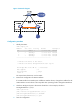
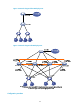
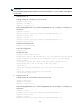
Set up a four-chassis IRF fabric at the access layer of the enterprise network in Figure 17. Configure a
MAD mechanism in the IRF fabric, because the IRF fabric has a multichassis aggregate link to Device E.