
R21xx-HP FlexFabric 11900 IRF Configuration Guide

43
IMPORTANT:
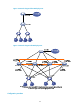
For two neighboring IRF members, IRF links must be bound to IRF-port 1 on one member and to IRF-por
t
2 on the other.
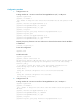
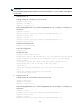
1. Configure Device A:
# Assign member ID 1 and priority 12 to Device A.
<Sysname> system-view
[Sysname] irf member 1
[Sysname] irf priority 12
# Bind Ten-GigabitEthernet 3/0/2 and Ten-GigabitEthernet 3/0/1 to IRF-port 1 and IRF-port 2,
respectively.
[Sysname] irf-port 1
[Sysname-irf-port1] port group interface ten-gigabitethernet 3/0/2
[Sysname-irf-port1] quit
[Sysname] irf-port 2
[Sysname-irf-port2] port group interface ten-gigabitethernet 3/0/1
[Sysname-irf-port2] quit
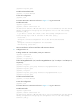
# Enable enhanced IRF mode.
[Sysname] irf mode enhanced
# Save the configuration.
[Sysname] save
# Enable IRF mode.
[Sysname] chassis convert mode irf
The device will switch to IRF mode and reboot. You are recommended to save the current
running configuration and specify the configuration file for the next startup.
Continue? [Y/N]:y
Do you want to convert the content of the next startup configuration file
flash:/startup.cfg to make it available in IRF mode? [Y/N]:y
Please wait...
Saving the converted configuration file to the main board succeeded.
Slot 1:
Saving the converted configuration file succeeded.
Now rebooting, please wait...
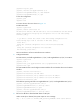
2. Configure Device B:
# Assign member ID 2 and member priority 26 to Device B.
<Sysname> system-view
[Sysname] irf member 2
[Sysname] irf priority 26
# Bind Ten-GigabitEthernet 3/0/1 and Ten-GigabitEthernet 3/0/2 to IRF-port 1 and IRF-port 2,
respectively.
[Sysname] irf-port 1
[Sysname-irf-port1] port group interface ten-gigabitethernet 3/0/1
[Sysname-irf-port1] quit
[Sysname] irf-port 2
[Sysname-irf-port2] port group interface ten-gigabitethernet 3/0/2