
R21xx-HP FlexFabric 11900 Layer 2 LAN Switching Command Reference
97
port-isolate enable
Use port-isolate enable to assign a port to an isolation group.
Use undo port-isolate enable to remove a port from an isolation group.
Syntax
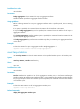
port-isolate enable group group-number
undo port-isolate enable
Default
No ports are assigned to an isolation group.
Views
Layer 2 Ethernet interface view, Layer 2 aggregate interface view
Predefined user roles
network-admin
Parameters
group group-number: Specifies an isolation group by its number in the range of 1 to 8.
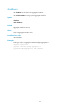
Usage guidelines
The configuration in Layer 2 Ethernet interface view applies only to the interface.
The configuration in Layer 2 aggregate interface view applies to the Layer 2 aggregate interface and its
aggregation member ports. If the device fails to apply the configuration to the aggregate interface, it
does not assign any aggregation member port to the isolation group. If the failure occurs on an
aggregation member port, the device skips the port and continues to assign other aggregation member
ports to the isolation group.
You cannot assign the member ports of a service loopback group to an isolation group, and vice versa.
To assign ports to the specified isolation group, make sure the isolation group already exists.
Examples
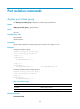
# Assign ports Ten-GigabitEthernet 1/0/1 and Ten-GigabitEthernet 1/0/2 to isolation group 2.
<Sysname> system-view
[Sysname] interface ten-gigabitethernet 1/0/1
[Sysname-Ten-GigabitEthernet1/0/1] port-isolate enable group 2
[Sysname-Ten-GigabitEthernet1/0/1] quit
[Sysname] interface ten-gigabitethernet 1/0/2
[Sysname-Ten-GigabitEthernet1/0/2] port-isolate enable group 2
Related commands
display port-isolate group
port-isolate group
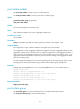
Use port-isolate group to create an isolation group on a multiple-isolation-group device.
Use undo port-isolate group to remove isolation groups.