
R21xx-HP FlexFabric 11900 Layer 2 LAN Switching Command Reference

5
Examples
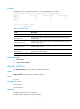
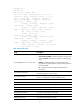
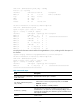
# Display the inbound traffic rate statistics for all Ten-GigabitEthernet interfaces.
<Sysname> display counters rate inbound interface ten-gigabitethernet
Interface Total (pps) Broadcast (pps) Multicast (pps)
XGE1/0/1 200 100 100
XGE1/0/2 300 200 100
XGE1/0/3 300 200 100
Overflow: More than 14 digits.
--: Not supported.
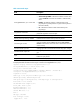
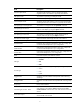
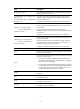
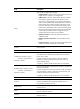
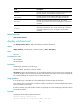
Table 2 Command output
Field Description
Interface Abbreviated interface name.
Total (pkts/sec)
Average rate (in pps) of receiving or sending packets during the statistics
polling interval.
Broadcast (pkts/sec)
Average rate (in pps) of receiving or sending broadcast packets during the
statistics polling interval.
Multicast (pkts/sec)
Average rate (in pps) of receiving or sending multicast packets during the
statistics polling interval.
Overflow: more than 14
decimal digits
The command displays Overflow if the data length of a statistical item is
greater than 14 decimal digits.
--: not supported The statistical item is not supported.
Related commands
• flow-interval
• reset counters interface
display interface
Use display interface to display Ethernet interface information.
Syntax
display interface [ interface-type [ interface-number ] ]
Views
Any view
Predefined user roles
network-admin
network-operator
Parameters
interface-type: Specifies an interface type.
interface-number: Specifies an interface number.