
R21xx-HP FlexFabric 11900 Layer 2 LAN Switching Command Reference


159
Interface PVID VLAN Passing
XGE1/0/8 2 1-4, 6-100, 145, 177, 189-200, 244, 289, 400,
555, 600-611, 1000, 2006-2008
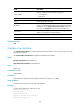
Table 36 Command output
Field Description
Interface Interface name.
PVID Port VLAN ID.
VLAN Passing VLANs for which the port allows packets to pass through.
Tagged VLANs for which the port sends packets without removing VLAN tags.
Untagged VLANs for which the port sends packets after removing VLAN tags.
port
Use port to assign the specified access ports to the VLAN.
Use undo port to remove the specified access ports from the VLAN.
Syntax
port interface-list
undo port interface-list
Default
All ports are in VLAN 1.
Views
VLAN view
Predefined user roles
network-admin
Parameters
interface-list: Specifies an interface list, in the format of interface-list = { interface-type interface-number
[ to interface-type interface-number ] }&<1-10>, where interface-type interface-number represents the
interface type and interface number, and &<1-10> indicates that you can specify up to 10 interface-type
interface-number [ to interface-type interface-number ] parameters.
Usage guidelines
This command is applicable only on access ports.
By default, all ports are access ports. However, you can manually configure the port type. For more
information, see "port link-type."
Examples
# Assign Ten-GigabitEthernet 1/0/1 through Ten-GigabitEthernet 1/0/3 to VLAN 2.
<Sysname> system-view
[Sysname] vlan 2
[Sysname-vlan2] port ten-gigabitethernet 1/0/1 to ten-gigabitethernet 1/0/3