
R21xx-HP FlexFabric 11900 Layer 2 LAN Switching Command Reference

12
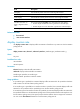
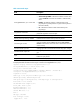
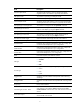
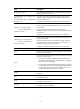
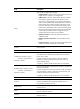
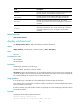
Field Description
collisions
Number of frames that the interface stopped transmitting because
Ethernet collisions were detected during transmission.
late collisions
Number of frames that the interface deferred to transmit after
transmitting their first 512 bits because of detected collisions.
lost carrier
Number of carrier losses during transmission. This counter
increases by one when a carrier is lost, and applies to serial WAN
interfaces.
no carrier
Number of times that the port failed to detect the carrier when
attempting to send frames. This counter increases by one when a
port failed to detect the carrier, and applies to serial WAN
interfaces.
Related commands
reset counters interface
display interface brief
Use display interface brief to display brief Ethernet interface information.
Syntax
display interface [ interface-type [ interface-number ] ] brief [ description ]
Views
Any view
Predefined user roles
network-admin
network-operator
Parameters
interface-type: Specifies an interface type.
interface-number: Specifies an interface number.
description: Displays the full description of the specified interface. If the keyword is not specified, the
command displays at most the first 27 characters of the interface description. If the keyword is specified,
the command displays all characters of the interface description.
Usage guidelines
If no interface type is specified, this command displays information about all interfaces.
If an interface type is specified but no interface number is specified, this command displays information
about all interfaces of that type.
If both the interface type and interface number are specified, this command displays information about
the specified interface.
Examples
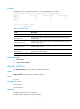
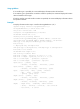
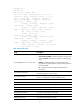
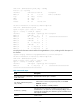
# Display brief information about all interfaces.
<Sysname> display interface brief
The brief information of interface(s) under route mode: