
R21xx-HP FlexFabric 11900 Layer 2 LAN Switching Command Reference


189
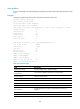
Usage guidelines
If no port is specified, this command displays the global LLDP status and the LLDP status information of all
ports.
Examples
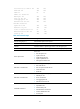
# Display the global LLDP status and the LLDP status information of all ports.
<Sysname> display lldp status
Global status of LLDP: Enable
The current number of LLDP neighbors: 0
The current number of CDP neighbors: 0
LLDP neighbor information last changed time: 0 days, 0 hours, 4 minutes, 40 seconds
Transmit interval : 30s
Hold multiplier : 4
Reinit delay : 2s
Transmit delay : 2s
Trap interval : 5s
Fast start times : 3
LLDP status information of Port 1 [Ten-GigabitEthernet1/0/1]:
Port status of LLDP : Enable
Admin status : Tx_Rx
Trap flag : No
MED trap flag : No
Polling interval : 0s
Number of LLDP neighbors : 0
Number of MED neighbors : 0
Number of CDP neighbors : 0
Number of sent optional TLV : 12
Number of received unknown TLV : 5
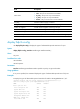
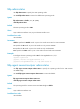
Table 43 Command output
Field Descri
p
tion
Global status of LLDP Indicates whether LLDP is globally enabled.
LLDP neighbor information last
changed time
Time when the neighbor information was last updated.
Transmit interval LLDPDU transmit interval.
Hold multiplier TTL multiplier.
Reinit delay LLDP re-initialization delay.
Transmit delay LLDPDU transmit delay.
Trap interval Trap transmit interval.
Fast start times
Number of LLDPDUs sent each time fast LLDPDU transmission is
triggered.
Port 1 LLDP status of port 1.
Port status of LLDP Indicates whether LLDP is enabled on the port.