
R21xx-HP FlexFabric 11900 Layer 2 LAN Switching Command Reference


15
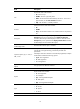
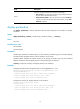
Field Description
Cause
Causes for the physical state of an interface to be DOWN.
• Not connected—No physical connection exists (possibly because the
network cable is disconnected or faulty).
• Administratively DOWN—The port was shut down with the shutdown
command. To restore the physical state of the interface, use the undo
shutdown command.
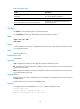
display packet-drop
Use display packet-drop to display information about packets dropped on an interface or multiple
interfaces.
Syntax
display packet-drop { interface [ interface-type [ interface-number ] ] | summary }
Views
Any view
Predefined user roles
network-admin
network-operator
Parameters
interface-type: Specifies an interface type. If you do not specify an interface type, this command displays
information about dropped packets on all the interfaces on the switch.
interface-number: Specifies an interface number. If you specify an interface type only, this command
displays information about dropped packets on the specified type of interfaces.
summary: Displays the summary of dropped packets on all interfaces.
Examples
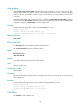
# Display information about dropped packets on Ten-GigabitEthernet 1 /0/1.
<Sysname> display packet-drop interface ten-gigabitethernet 1/0/1
Ten-GigabitEthernet1/0/1:
Packets dropped due to full GBP or insufficient bandwidth: 0
Packets dropped due to Fast Filter Processor (FFP): 0
Packets dropped due to STP non-forwarding state: 0
# Display the summary of dropped packets on all interfaces.
<Sysname> display packet-drop summary
All interfaces:
Packets dropped due to full GBP or insufficient bandwidth: 0
Packets dropped due to Fast Filter Processor (FFP): 3674
Packets dropped due to STP non-forwarding state: 0