
R21xx-HP FlexFabric 11900 Layer 2 LAN Switching Command Reference


16
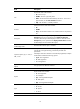
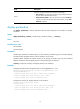
Table 6 Command output
Field Description
Packets dropped due to full GBP or insufficient
bandwidth
Packets that are dropped because the buffer is used
up or the bandwidth is insufficient.
Packets dropped due to Fast Filter Process (FFP) Packets that are filtered out.
Packets dropped due to STP non-forwarding state
Packets that are dropped because STP is in the
non-forwarding state.
duplex
Use duplex to set the duplex mode for an Ethernet interface.
Use undo duplex to restore the default duplex mode of the Ethernet interface.
Syntax
duplex { auto | full | half }
undo duplex
Default
A 10-GE XFP fiber port operates in full duplex mode, and all other types of Ethernet interfaces operate
in autonegotiation mode.
Views
Ethernet interface view
Predefined user roles
network-admin
Parameters
auto: Configures the interface to autonegotiate the duplex mode with the peer.
full: Configures the interface to operate in full duplex mode, so that the interface can receive and transmit
packets at the same time.
half: Configures the interface to operate in half duplex mode, so that the interface can only receive or
only transmit packets at one time.
Usage guidelines
Ethernet copper ports that are configured with a 1000-Mbps port speed and fiber ports do not support
the half keyword.
10-GE XFP fiber ports do not support the auto keyword.
Examples
# Configure interface Ten-GigabitEthernet 1/0/1 to operate in full duplex mode.
<Sysname> system-view
[Sysname] interface ten-gigabitethernet 1/0/1
[Sysname-Ten-GigabitEthernet1/0/1] duplex full