
R21xx-HP FlexFabric 11900 Layer 2 LAN Switching Command Reference


23
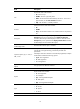
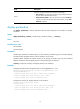
To use the PFC feature on a link, make sure it is enabled on both ends of the link. An interface processes
PFC pause frames only when PFC is enabled on it.
The state of the PFC function is co-determined by the PFC configurations on the local port and on the peer.
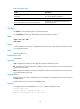
In Table 7, th
e first line lists the PFC configuration on the lo
cal port, the first column lists the PFC
configuration on the peer, and enabled and disabled are the two possible negotiation results.
Table 7 PFC configurations and negotiation results
Local (right)
Peer (below)
enable auto Default
enable Enabled Enabled. Disabled
auto Enabled
• Enabled if negotiation succeeds.
• Disabled if negotiation fails.
Disabled
Default Disabled Disabled. Disabled
Examples
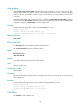
# Configure Ten-GigabitEthernet 1/0/1 to automatically negotiate with its peer to enable PFC.
<Sysname> system-view
[Sysname] interface ten-gigabitethernet 1/0/1
[Sysname-Ten-GigabitEthernet1/0/1] priority-flow-control auto
Related commands
priority-flow-control no-drop dot1p
priority-flow-control no-drop dot1p
Use priority-flow-control no-drop dot1p to enable PFC for specific 802.1p priorities on an Ethernet
interface.
Use undo priority-flow-control no-drop dot1p to restore the default.
Syntax
priority-flow-control no-drop dot1p dot1p-list
undo priority-flow-control no-drop dot1p
Default
PFC is disabled for all 802.1p priorities.
Views
System view ,Ethernet interface view
Predefined user roles
network-admin
Parameters
dot1p-list: Specifies an 802.1p priority (or dot1p priority) list to identify flows that are subject to PFC(for
example: 1,3-5). A hyphen (-) connects two numeric values, which together indicate a continuous value
range. Different values or value ranges are separated with commas (,). You can configure up to 16
characters for this argument.