
R21xx-HP FlexFabric 11900 Layer 2 LAN Switching Command Reference


25
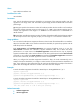
the range specified by the dot1p-list argument, the port preferentially sends the packet. For more
information about the 802.1p-local priority mapping table, see ACL and QoS Configuration Guide.
If you configure the flow control or flow-control receive enable command on a PFC-enabled port,
the PFC configuration takes effect, and the configuration of the flow control or flow-control receive
enable command is ignored. The latter takes effect on the port only when PFC is disabled on it.
Examples
# Configure Ten-GigabitEthernet 1/0/1 to automatically negotiate with the peer port to enable
PFC, and enable PFC for 802.1p priority 5.
<Sysname> system-view
[Sysname] interface ten-gigabitethernet 1/0/1
[Sysname-Ten-GigabitEthernet1/0/1] priority-flow-control auto
[Sysname-Ten-GigabitEthernet1/0/1] priority-flow-control no-drop dot1p 5
Related commands
priority-flow-control
flow-control
flow-control receive enable
reset counters interface
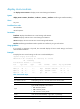
Use reset counters interface to clear the Ethernet interface statistics.
Syntax
reset counters interface [ interface-type [ interface-number ] ]
Views
User view
Predefined user roles
network-admin
Parameters
interface-type: Specifies an interface type.
interface-number: Specifies an interface number.
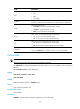
Usage guidelines
Before collecting traffic statistics for a specific period of time on an interface, clear the old statistics first.
If no interface type is specified, this command clears statistics for all interfaces.
If only the interface type is specified, this command clears statistics for all interfaces of that type.
If both the interface type and the interface number are specified, this command clears statistics for the
specified interface.
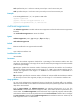
Examples
# Clear the statistics of Ten-GigabitEthernet 1/0/1.
<Sysname> reset counters interface ten-gigabitethernet 1/0/1
Related commands
• display interface