
R21xx-HP FlexFabric 11900 Layer 2 LAN Switching Command Reference
34
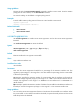
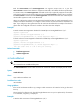
When you configure the multicast suppression threshold in kbps, the switch automatically uses a multiple
of 64 as the threshold. If you configure a value less than 64, the switch sets the threshold to 64 kbps. If
you configure a value greater than 64, the switch sets the threshold to a multiple of 64 which is greater
than the configured value and is nearest to the value than other multiples.
Examples
# Set the multicast storm suppression threshold to 10000 kbps on Ten-GigabitEthernet 1/0/1.
<Sysname> system-view
[Sysname] interface ten-gigabitethernet 1/0/1
[Sysname-Ten-GigabitEthernet1/0/1] multicast-suppression kbps 10000
# Set the multicast suppression threshold to 10000 kbps on Ten-GigabitEthernet 1/0/1.
<Sysname> system-view
[Sysname] interface ten-gigabitethernet 1/0/1
[Sysname-Ten-GigabitEthernet1/0/1] multicast-suppression kbps 10000
Info: The actual value is 10048 on this port currently.
Related commands
• broadcast-suppression
• unicast-suppression
storm-constrain
Use storm-constrain to enable broadcast, multicast, or unknown unicast storm control on an Ethernet
port.
Use undo storm-constrain to disable storm control.
Syntax
storm-constrain { broadcast | multicast | unicast } { pps | kbps | ratio } upperlimit lowerlimit
undo storm-constrain { all | broadcast | multicast | unicast }
Default
Traffic storm control is disabled.
Views
Layer 2 Ethernet interface view
Predefined user roles
network-admin
Parameters
all: Disables storm control for all types of packets: broadcast, multicast, and unknown unicast.
broadcast: Enables or disables broadcast storm control.
multicast: Enables or disables multicast storm control.
unicast: Enables or disables unknown unicast storm control.
pps: Sets storm control thresholds in pps.
kbps: Sets storm control thresholds in kbps.
ratio: Sets storm control thresholds as a percentage of the transmission capacity of the interface.