
R21xx-HP FlexFabric 11900 Layer 2 LAN Switching Command Reference
66
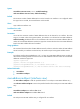
Predefined user roles
network-admin
Parameters
multiport: Specifies a multiport unicast MAC address entry.
mac-address: Specifies a unicast MAC address in H-H-H format, excluding multicast and all-zero MAC
addresses. When entering a MAC address, you can omit the leading zeros in each H section. For
example, enter f-e2-1 for 000f-00e2-0001.
interface interface-list: Specifies interfaces in the format of { { interface-type interface-number } [ to
{ interface-type interface-number } ] } &<1-4>. The interface type can be the Layer 2 Ethernet interface or
Layer 2 aggregate interface. &<1-4> specifies that you can configure up to 4 interfaces or interface
ranges.
vlan vlan-id: Specifies an existing VLAN to which the interfaces belong. The value range for the vlan-id
argument is 1 to 4094.
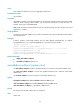
Usage guidelines
A multiport unicast MAC address entry is used to send frames with a specific destination MAC address
out of multiple ports. When you execute this command for the first time, the command adds a MAC
address entry. When you execute the command again with the same MAC address and VLAN but with
different interfaces, this command adds the specified interfaces for this entry.
If you execute the undo mac-address [ multiport ] [ [ mac-address ] vlan vlan-id ] command without
specifying the multiport keyword, this command deletes all matching MAC address entries.
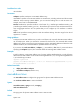
Examples
# Add a multiport unicast MAC address entry for MAC address 000f-e201-0101 to send all frames
destined for this MAC address out of interfaces Ten-GigabitEthernet 1/0/1 through Ten-GigabitEthernet
1/0/3 that belong to VLAN 2.
<Sysname> system-view
[Sysname] mac-address multiport 000f-e201-0101 interface ten-gigabitethernet 1/0/1 to
ten-gigabitethernet 1/0/3 vlan 2
Related commands
• display mac-address multiport
• mac-address multiport (interface view)
mac-address timer
Use mac-address timer to configure the aging timer for dynamic MAC address entries.
Use undo mac-address timer to restore the default.
Syntax
mac-address timer { aging seconds | no-aging }
undo mac-address timer
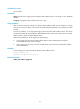
Default
The aging timer for dynamic MAC address entries is 300 seconds.
Views
System view