
R21xx-HP FlexFabric 11900 Layer 2 LAN Switching Configuration Guide


100
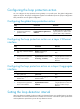
To set the loop detection interval:
Ste
p
Command
Remarks
1. Enter system view.
system-view N/A
2. Set the loop detection interval.
loopback-detection interval-time
interval
The default setting is 30 seconds.
Displaying and maintaining loop detection
Execute display commands in any view.
Task Command
Display the loop detection configuration and status. display loopback-detection
Loop detection configuration example
Network requirements
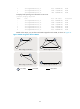
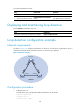
As shown in Figure 25, configure loop detection on Device A, so that Device A generates a log as a
notification and automatically shuts down the port on which a loop is detected.
Figure 25 Network diagram
Configuration procedure
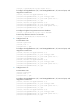
1. Configure Device A:
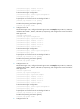
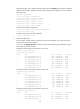
# Create VLAN 100, and globally enable loop detection for the VLAN.
<DeviceA> system-view
[DeviceA] vlan 100
[DeviceA-vlan100] quit
XGE1/0/1
Device A
Device B Device C
XGE1/0/2
VLAN 100