
R21xx-HP FlexFabric 11900 Layer 2 LAN Switching Configuration Guide


3
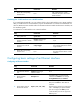
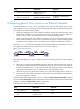
Step Command Remarks
4. Reboot the corresponding
interface card.
N/A
After creating the four 10-GE
interfaces, the system removes the
40-GE interface.
Combining four 10-GE interfaces into a 40-GE interface
If you need higher bandwidth, you can combine the four split 10-GE interfaces into a 40-GE interface.
After you combine the four 10-GE interfaces, replace the dedicated 1-to-4 cable with a dedicated 1-to-1
cable or 40-GE transceiver module cable. For information about the cables and transceiver modules, see
the installation guide.
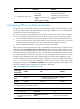
To combine four 10-GE interfaces into a 40-GE interface:
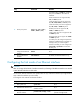
Step Command Remarks
1. Enter system view.
system-view N/A
2. Enter the view of any 10-GE
interface split from a 40-GE
interface.
interface interface-type
interface-number
N/A
3. Combine the four 10-GE
interfaces into a 40-GE
interface.
using fortygige
By default, 10-GE interfaces split
from a 40-GE interface are used as
single interfaces.
4. Reboot the corresponding
interface card.
N/A
After creating the 40-GE interface,
the system removes the four 10-GE
interfaces.
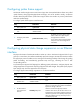
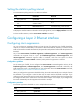
Configuring basic settings of an Ethernet interface
Configuring an Ethernet interface
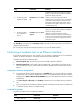
Step Command Remarks
1. Enter system view.
system-view N/A
2. Enter Ethernet interface
view.
interface interface-type
interface-number
N/A
3. Set the interface
description.
description text
The default setting is in the format of
interface-name Interface. For example,
Ten-GigabitEthernet1/0/1 Interface.
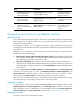
4. Set the duplex mode of
the Ethernet interface.
duplex { auto | full | half }
The default setting is full for 10-GE XFP
fiber ports and auto for other Ethernet
interfaces.
Ethernet copper ports that are configured
with a 1000-Mbps port speed and fiber
ports do not support the half keyword.
10-GE XFP fiber ports do not support the
auto keyword.