
R21xx-HP FlexFabric 11900 Layer 2 LAN Switching Configuration Guide


4
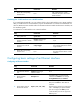
Step Command Remarks
5. Set the port speed.
speed { 10 | 100 | 1000 |
10000 | 40000 | auto }
The default setting is 10000 for 10-GE XFP
fiber ports and auto for other Ethernet
interfaces.
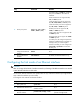
40-GE interfaces do not support the 10,
100, or 1000 keyword.
10-GE XFP fiber ports do not support the
10, 100, 1000, 40000, or auto keyword.
10-GE SFP+ fiber ports do not support the
10, 100, 1000, or 40000 keyword.
GE fiber ports do not support the 10,
10000, or 40000 keyword.
10-GE copper ports do not support the 10
or 40000 keyword.
GE copper ports do not support the 10000
or 40000 keyword.
For a fiber port, the configured speed must
match the installed transceiver module. For
example, when you install a Gigabit
transceiver module, you must configure the
speed 1000 or speed auto command for
the fiber port.
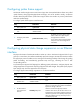
6. Restore the default
settings for the Ethernet
interface.
default N/A
7. Bring up the Ethernet
interface.
undo shutdown By default, an Ethernet interface is up.
Configuring the link mode of an Ethernet interface
CAUTION:
A
fter you chan
g
e the link mode of an Ethernet interface, all settin
g
s of the Ethernet interface are restored
to their defaults under the new link mode.
On the switch, Ethernet interfaces can operate either as Layer 2 Ethernet interfaces (in bridge mode) or
Layer 3 Ethernet interfaces (in route mode).
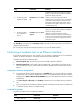
To change the link mode of an Ethernet interface:
Step Command Remarks
1. Enter system view.
system-view N/A
2. Enter Ethernet interface view.
interface interface-type
interface-number
N/A
3. Change the link mode of the
Ethernet interface.
port link-mode { bridge | route }
By default, an Ethernet interface
operates in bridge mode.