
R21xx-HP FlexFabric 11900 Layer 2 LAN Switching Configuration Guide


116
Ste
p
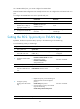
Command Remarks
2. Enter Layer 2 Ethernet
interface view or Layer 2
aggregate interface view.
interface interface-type
interface-number
N/A
3. Configure the link type.
port link-type { hybrid | trunk }
By default, a port is an access
port.
4. Assign the port to the
transparent VLANs and the
PVID.
• On a hybrid port:
port hybrid vlan vlan-id-list { tagged
| untagged }
• On a trunk port:
port trunk permit vlan { vlan-id-list |
all }
By default:
• A trunk port is only in
VLAN 1.
• A hybrid port is only an
untagged member in
VLAN 1.
5. Enable QinQ on the port.
qinq enable By default, QinQ is disabled.
6. Configure transparent
transmission for a list of
VLANs on the port.
qinq transparent-vlan vlan-list
By default, transparent
transmission is not configured
for any VLANs on a port.
Configuring the TPID for VLAN tags
TPID identifies a frame as an 802.1Q tagged frame. On the device, the TPID in the 802.1Q tag added
on a QinQ-enabled port is 0x8100 by default, in compliance with IEEE 802.1Q. However, the TPID value
varies with vendors. In a multi-vendor network, you must make sure the TPID setting is the same across all
devices so 802.1Q tagged frames can be identified correctly.
TPID settings include CVLAN TPID and SVLAN TPID.
A QinQ-enabled port uses the CLAN TPID to match incoming tagged frames. An incoming frame is
handled as an untagged frame if its TPID is different from the CVLAN TPID. The device supports one
CVLAN TPID for all QinQ-enabled ports.
A service provider-side port uses the SVLAN TPID to replace the TPID in outgoing frames' SVLAN tags, in
addition to matching incoming tagged frames. SVLAN TPIDs are configurable on a per-port basis.
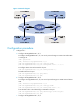
For example, the PE device is connected to a customer device that uses the TPID 0x8200 and to a
provider device that uses the TPID 0x9100. To be compatible with these devices, you must configure
0x8200 and 0x9100 as the CVLAN TPID and SVLAN TPID, respectively. Otherwise, the devices cannot
correctly identify tagged frames between them.
Configuring the CVLAN TPID
Ste
p
Command Remarks
1. Enter system view.
system-view N/A
2. Configure the TPID value for
CVLAN tags.
qinq ethernet-type customer-tag
hex-value
The default setting is 0x8100 for
CVLAN tags.
Configuring the SVLAN TPID
Configure the SVLAN TPID on service provider-side ports of PEs.