
R21xx-HP FlexFabric 11900 Layer 2 LAN Switching Configuration Guide


118
Ste
p
Command
Remarks
8. Create a QoS policy and
enter QoS policy view.
qos policy policy-name N/A
9. Associate the traffic class
with the traffic behavior in
the QoS policy.
classifier classifier-name behavior
behavior-name
N/A
10. Return to system view.
quit N/A
11. Enter Layer 2 Ethernet
interface view.
interface interface-type interface-number
N/A
12. Configure the interface to
trust the 802.1p priority in
incoming frames.
undo qos trust
By default, the device trusts
the 802.1p priority carried
in frames.
Skip this step if the remark
dot1p customer-dot1p-trust
command is configured.
13. Enable QinQ.
qinq enable N/A
14. Apply the QoS policy to
the inbound direction of
the interface.
qos apply policy policy-name inbound N/A
For more information about QoS policies, see ACL and QoS Configuration Guide.
Displaying and maintaining QinQ
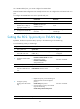
Execute the display command in any view.
Task Command
Display the QinQ-enabled ports.
display qinq [ interface interface-type
interface-number ]
QinQ configuration example
Network requirements
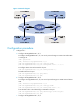
As shown in Figure 31, the two branches of Company A, Site 1 and Site 2, are connected through the
service provider network and use CVLANs 10 through 70. The two branches of Company B, Site 3 and
Site 4, are connected through the service provider network and use CVLANs 30 through 90. PE 1 and
PE 2 are edge devices on the service provider network and are connected through third-party devices
with a TPID value of 0x8200.
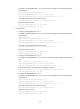
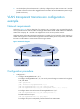
Configure the edge and third-party devices to enable communication between the branches of Company
A through SVLAN 100 and communication between the branches of Company B through SVLAN 200.