
R21xx-HP FlexFabric 11900 Layer 2 LAN Switching Configuration Guide


119
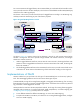
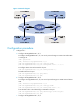
Figure 31 Network diagram
Configuration procedure
1. Configure PE 1:
a. Configure Ten-GigabitEthernet 1/0/1:
# Configure Ten-GigabitEthernet 1/0/1 as a trunk port and assign it to VLAN 100 and VLANs
10 through 70.
<PE1> system-view
[PE1] interface ten-gigabitethernet 1/0/1
[PE1-Ten-GigabitEthernet1/0/1] port link-type trunk
[PE1-Ten-GigabitEthernet1/0/1] port trunk permit vlan 100 10 to 70
# Configure VLAN 100 as the PVID for the port.
[PE1-Ten-GigabitEthernet1/0/1] port trunk pvid vlan 100
# Enable QinQ on the port.
[PE1-Ten-GigabitEthernet1/0/1] qinq enable
[PE1-Ten-GigabitEthernet1/0/1] quit
b. Configure Ten-GigabitEthernet 1/0/2:
# Configure Ten-GigabitEthernet 1/0/2 as a trunk port and assign it to VLAN 100 and VLAN
200.
[PE1] interface ten-gigabitethernet 1/0/2
[PE1-Ten-GigabitEthernet1/0/2] port link-type trunk
[PE1-Ten-GigabitEthernet1/0/2] port trunk permit vlan 100 200
# Set the TPID value in the SVLAN tags to 0x8200 on the port.
[PE1-Ten-GigabitEthernet1/0/2] qinq ethernet-type service-tag 8200
[PE1-Ten-GigabitEthernet1/0/2] quit
c. Configure Ten-GigabitEthernet 1/0/3: