
R21xx-HP FlexFabric 11900 Layer 2 LAN Switching Configuration Guide


121
3. On the third-party devices between PE 1 and PE 2, configure the port that connects to PE 1 and the
port that connects to PE 2 to allow tagged frames from VLAN 100 and VLAN 200 to pass through.
(Details not shown.)
VLAN transparent transmission configuration
example
Network requirements
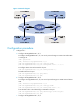
As shown in Figure 32, the two branches of a company, Site 1 and Site 2, are connected through the
service provider network and use VLANs 10 through 50 and VLAN 3000. VLAN 3000 is the dedicated
VLAN of the company. PE 1 and PE 2 are edge devices on the service provider network.
Configure QinQ and VLAN transparent transmission to enable the two branches of the company in
VLANs 10 through 50 to communicate through VLAN 100 allocated by the service provider, and enable
the hosts in VLAN 3000 to communicate without using a SVLAN.
Figure 32 Network diagram
Configuration procedure
1. Configure PE 1:
a. Configure Ten-GigabitEthernet 1/0/1:
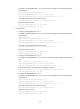
# Configure Ten-GigabitEthernet 1/0/1 as a trunk port and assign it to VLANs 10 through 50,
100, and 3000.
<PE1> system-view
[PE1] interface ten-gigabitethernet 1/0/1
[PE1-Ten-GigabitEthernet1/0/1] port link-type trunk
[PE1-Ten-GigabitEthernet1/0/1] port trunk permit vlan 100 3000 10 to 50
# Configure VLAN 100 as the PVID of Ten-GigabitEthernet 1/0/1.
[PE1-Ten-GigabitEthernet1/0/1] port trunk pvid vlan 100
# Enable QinQ on the port.
[PE1-Ten-GigabitEthernet1/0/1] qinq enable
# Configure the port to transparently transmit frames from VLAN 3000.