
R21xx-HP FlexFabric 11900 Layer 2 LAN Switching Configuration Guide


6
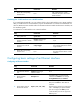
Step Command Remarks
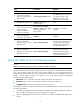
4. Set the link-up event
suppression interval.
link-delay delay-time mode
up
By default, each time the physical link of a port
goes up or comes down, the interface immediately
reports the change to the CPU.
With this command configured, when the
interface goes up, the link-up event is not reported
to the CPU until the interface is still up when the
suppression interval (delay-time) expires. When
the interface comes down, the link-down event is
immediately reported.
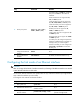
5. Set the link-updown
event suppression
interval.
link-delay delay-time mode
updown
By default, each time the physical link of a port
goes up or comes down, the interface immediately
reports the change to the CPU.
With this command configured, when the
interface comes down or goes up, the link-updown
event is not reported to the CPU until the interface
is still down or up when the suppression interval
(delay-time) expires.
The link-delay command and the link-delay mode command overwrite each other, and whichever is
configured last takes effect.
Do not configure physical state change suppression on a port with MSTP enabled.
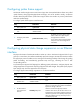
Performing a loopback test on an Ethernet interface
If an Ethernet interface does not work correctly, you can perform a loopback test on it to identify the
problem. An Ethernet interface in a loopback test does not forward data traffic.
Loopback tests include the following types:
• Internal loopback test—Tests all on-chip functions related to Ethernet interfaces.
• External loopback test—Also called "remote loopback test." An interface in this mode returns a
received packet back to the packet sender. This function identifies link failures between network
devices.
Configuration restrictions and guidelines
• On a physically down interface (displayed as in DOWN state), you can only perform an internal
loopback test, and an external loopback test will fail. On an administratively shut down interface
(displayed as in ADM or Administratively DOWN state), you cannot perform an internal or external
loopback test.
• The speed, duplex, mdix-mode, and shutdown commands are not available during a loopback
test.
• During a loopback test, the Ethernet interface operates in full duplex mode. When a loopback test
is complete, the port returns to its duplex setting.
Configuration procedure
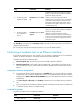
To perform a loopback test on an Ethernet interface:
Step Command Remarks
1. Enter system view.
system-view N/A