
R21xx-HP FlexFabric 11900 Layer 2 LAN Switching Configuration Guide


7
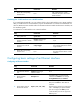
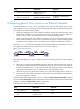
Step Command Remarks
2. Enter Ethernet interface view.
interface interface-type
interface-number
N/A
3. Perform a loopback test. loopback { external | internal }
By default, no loopback test is
performed.
Configuring generic flow control on an Ethernet interface
To avoid packet drops on a link, you can enable generic flow control at both ends of the link. When
traffic congestion occurs at the receiving end, the receiving end sends a flow control (pause) frame to ask
the sending end to suspend sending packets.
• With TxRx mode generic flow control enabled, an interface can both send and receive flow control
frames. When congestion occurs, the interface sends a flow control frame to its peer. When the
interface receives a flow control frame from the peer, it suspends sending packets.
• With Rx mode generic flow control enabled, an interface can receive but cannot send flow control
frames. When the interface receives a flow control frame from its peer, it suspends sending packets
to the peer. When congestion occurs, the interface cannot send flow control frames to the peer.
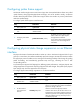
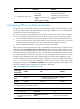
As shown in Figure 1, w
hen both Port A and Port B forward packets at the rate of 1000 Mbps, Port C will
be c
ongested. To avoid packet loss, enable flow control on Port A and Port B.
Figure 1 Flow control on ports
When TxRx mode generic flow control is enabled on Port B and Rx mode generic flow control is enabled
on Port A:
• When Port C is congested, Switch B buffers the packet. When the buffered packets reach a specific
size, Switch B learns that the traffic forwarded from Port B to Port C is too heavy and exceeds the
forwarding capability of Port C. In this case, Port B with TxRx mode generic flow control enabled
sends generic pause frames to Port A and tells Port A to suspend sending packets.
• When Port A receives the generic pause frames, Port A suspends sending packets to Port B for a
certain period, which is carried in the generic pause frames. Port B sends generic pause frames to
Port A until congestion is removed.
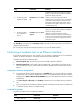
To handle unidirectional traffic congestion on a link, configure the flow-control receive enable command
at one end and the flow-control command at the other end. To enable both ends of a link to handle traffic
congestion, configure the flow-control command at both ends.
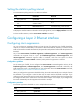
To enable generic flow control on an Ethernet interface:
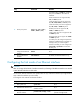
Step Command Remarks
1. Enter system view. system-view N/A
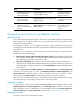
2. Enter Ethernet interface
view.
interface interface-type
interface-number
N/A