
R21xx-HP FlexFabric 11900 Layer 2 LAN Switching Configuration Guide


142
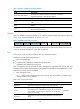
Tasks at a
g
lance
Performing basic LLDP configuration:
• (Required.) Enabling LLDP
• (Optional.) Setting the LLDP operating mode
• (Optional.) Setting the LLDP re-initialization delay
• (Optional.) Enabling LLDP polling
• (Optional.) Configuring the advertisable TLVs
• (Optional.) Configuring the management address and its encoding format
• (Optional.) Setting other LLDP parameters
• (Optional.) Setting an encapsulation format for LLDPDUs
(Optional.) Configuring CDP compatibility
(Optional.) Configuring DCBX
(Optional.) Configuring LLDP trapping and LLDP-MED trapping
Performing basic LLDP configuration
Enabling LLDP
To make LLDP take effect on specific ports, you must enable LLDP both globally and on these ports.
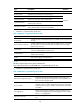
To enable LLDP:
Step Command Remarks
1. Enter system view.
system-view N/A
2. Enable LLDP globally.
lldp global enable
By default, LLDP is disabled
globally.
3. Enter Layer 2 or Layer 3
Ethernet interface view.
interface interface-type interface-number N/A
4. (Optional.) Enable LLDP.
lldp enable
By default, LLDP is enabled
on a port.
Setting the LLDP operating mode
LLDP can operate in one of the following modes:
• TxRx mode—A port in this mode can send and receive LLDPDUs.
• Tx mode—A port in this mode can only send LLDPDUs.
• Rx mode—A port in this mode can only receive LLDPDUs.
• Disable mode—A port in this mode cannot send or receive LLDPDUs.
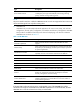
To set the LLDP operating mode:
Step Command Remarks
1. Enter system view.
system-view N/A