
R21xx-HP FlexFabric 11900 Layer 2 LAN Switching Configuration Guide



143
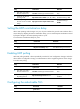
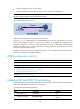
Step Command Remarks
2. Enter Layer 2 or Layer 3
Ethernet interface view.
interface interface-type interface-number N/A
3. (Optional.) Set the LLDP
operating mode.
lldp admin-status { disable | rx | tx | txrx }
The default setting is txrx.
4. Set the operating mode for
the LLDP nearest non-TPMR
bridge.
lldp agent nearest-nontpmr admin-status
The default setting is
disable.
Setting the LLDP re-initialization delay
When LLDP operating mode changes on a port, the port initializes the protocol state machines after a
certain delay. By adjusting the LLDP re-initialization delay, you can avoid frequent initializations caused
by frequent changes to the LLDP operating mode on a port.
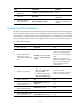
To set the LLDP re-initialization delay for ports:
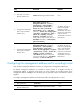
Ste
p
Command
Remarks
1. Enter system view.
system-view
N/A
2. Set the LLDP re-initialization
delay.
lldp timer reinit-delay delay The default setting is 2 seconds.
Enabling LLDP polling
With LLDP polling enabled, a device periodically searches for local configuration changes. When the
device detects a configuration change, it sends LLDPDUs to inform neighboring devices of the change.
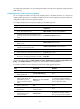
To enable LLDP polling:
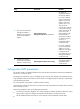
Step Command Remarks
1. Enter system view.
system-view N/A
2. Enter Layer 2 or Layer 3
Ethernet interface view.
interface interface-type interface-number N/A
3. Enable LLDP polling and set
the polling interval.
lldp check-change-interval interval
By default, LLDP polling is
disabled.
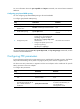
Configuring the advertisable TLVs
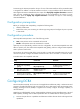
Step Command Remarks
1. Enter system view.
system-view N/A