
R21xx-HP FlexFabric 11900 Layer 2 LAN Switching Configuration Guide



144
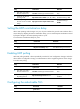
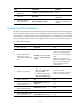
Step Command Remarks
2. Enter Layer 2 or Layer 3
Ethernet interface view.
interface interface-type interface-number N/A
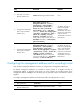
3. Configure the advertisable
TLVs (in Layer 2 Ethernet
interface view).
lldp tlv-enable { basic-tlv { all |
management-address-tlv [ ip-address ] |
port-description | system-capability |
system-description | system-name } |
dot1-tlv { all | dcbx | port-vlan-id |
protocol-vlan-id [ vlan-id ] | vlan-name
[ vlan-id ] } | dot3-tlv { all | link-aggregation
| mac-physic | max-frame-size | power } |
med-tlv { all | capability | inventory |
location-id { civic-address device-type
country-code { ca-type ca-value }&<1-10> |
elin-address tel-number } | network-policy |
power-over-ethernet } }
By default, all types of
LLDP TLVs except the
DCBX TLV, location
identification TLV, VLAN
Name TLVs, and Protocol
VLAN ID TLVs are
advertisable on a Layer 2
Ethernet port.
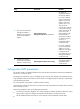
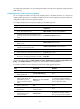
4. Configure the advertisable
TLVs (in Layer 3 Ethernet
interface view).
lldp tlv-enable { basic-tlv { all |
management-address-tlv [ ip-address ] |
port-description | system-capability |
system-description | system-name } |
dot3-tlv { all | link-aggregation | mac-physic
| max-frame-size | power } | med-tlv { all |
capability | inventory | location-id
{ civic-address device-type country-code
{ ca-type ca-value }&<1-10> | elin-address
tel-number } | power-over-ethernet } }
By default, all types of
LLDP TLVs except the IEEE
802.1 organizationally
specific TLVs, network
policy TLVs, and location
identification TLVs are
advertisable on a Layer 3
Ethernet port.
Configuring the management address and its encoding format
LLDP encodes management addresses in numeric or string format in management address TLVs.
By default, management addresses are encoded in numeric format. If a neighbor encodes its
management address in character string format, you must configure the encoding format of the
management address as string on the connecting port to guarantee normal communication with the
neighbor.
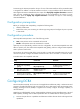
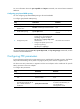
To configure a management address to be advertised and its encoding format on a port:
Step Command Remarks
1. Enter system view.
system-view N/A
2. Enter Layer 2 or Layer 3
Ethernet interface view.
interface interface-type interface-number N/A