
R21xx-HP FlexFabric 11900 Layer 2 LAN Switching Configuration Guide



146
• If the LLDPDU transmit delay is greater than the LLDPDU transmit interval, the device uses the
LLDPDU transmit delay as the transmit interval.
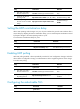
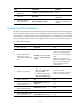
To change LLDP parameters:
Ste
p
Command
Remarks
1. Enter system view.
system-view N/A
2. Set the TTL multiplier.
lldp hold-multiplier value The default setting is 4.
3. Set the LLDPDU transmit
interval.
lldp timer tx-interval interval
The default setting is 30
seconds.
4. Set the LLDPDU transmit delay.
lldp timer tx-delay delay The default setting is 2 seconds.
5. Set the number of LLDPDUs
sent each time fast LLDPDU
transmission is triggered.
lldp fast-count count The default setting is 3.
Setting an encapsulation format for LLDPDUs
LLDPDUs can be encapsulated in the following formats: Ethernet II or SNAP frames.
• With Ethernet II encapsulation configured, an LLDP port sends LLDPDUs in Ethernet II frames.
• With SNAP encapsulation configured, an LLDP port sends LLDPDUs in SNAP frames.
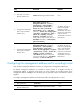
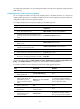
To set the encapsulation format for LLDPDUs to SNAP:
Step Command Remarks
1. Enter system view.
system-view
N/A
2. Enter Layer 2 or Layer 3
Ethernet interface view.
interface interface-type interface-number N/A
3. Set the encapsulation
format for LLDPDUs to
SNAP.
lldp encapsulation snap
By default, Ethernet II
encapsulation format
applies.
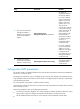
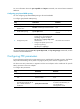
NOTE:
LLDP of earlier versions requires the same encapsulation format on both ends to process LLDPDUs. For this
reason, to communicate stably with a neighboring device running LLDP of earlier versions, the local device
should be configured with the same encapsulation format.
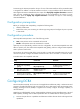
Configuring CDP compatibility
When the switch is directly connected to a Cisco device that supports only CDP rather than LLDP, you can
enable CDP compatibility to enable the switch to exchange information with the directly-connected
device.
With CDP compatibility enabled on the switch, the switch can use LLDP to receive and recognize the CDP
packets from the directly-connected device and send CDP packets to the directly-connected device. The
packets that the switch sends to the neighboring CDP device carry the device ID, the ID of the port
connecting to the neighboring device, the port IP address, the PVID, and the TTL. The port IP address is
the main IP address of the VLAN interface that is in up state and whose corresponding VLAN ID is the